Skip to content
  • Home
  • Resources
  • Support
  • Contributors
  • Get Involved
  • About
Search
Login Create Account
0
FAQ
→
Forum
0
Posts
-
Javadoc
Filter by type
Filter by category
  • 3-D
  • 3D
  • 3D coordinates
  • alignment
  • basics
  • batch processing
  • Calcium
  • cell tracking
  • CLEM
  • colocalization
  • comptage
  • confocal
  • connected components
  • contribution
  • convolution
  • correlation
  • deconvolution
  • deformable registration
  • denoising
  • detection
  • detector
  • developer
  • displacements
  • distance map
  • export
  • ezplug
  • feature detection
  • feature matching
  • filtering
  • fluorescence
  • gui
  • headless
  • helper
  • HSV visualisation
  • image process
  • ImageJ
  • intensity
  • mask
  • maven
  • measurement
  • MHT
  • microscopy
  • monitoring
  • morphology
  • multiple hypothesis tracking
  • Muscle
  • non rigid registration
  • operator
  • optimization
  • otsu
  • plugin
  • point-spread function
  • projection
  • protocol
  • PSF
  • python
  • registration
  • release
  • Ripley's K function
  • roi
  • script
  • scripting
  • segmentation
  • sequence
  • smoothing
  • spatial distribution
  • spot
  • spot count
  • statistics
  • surface
  • synthetic
  • threshold
  • toolbox
  • tools
  • track processor
  • tracking
  • tutorial
  • warping
  • wavelet transform
  • wavelets
  • widefield
  • workbook
  • XLS output
Introduction to Maven
Contributing to Icy development

How to install an Icy plugin

This article explains how to install a plugin depending on if the plugin is published or not on the Icy website.

The plugin is published on the Icy website

Search the plugin on the search bar of Icy.
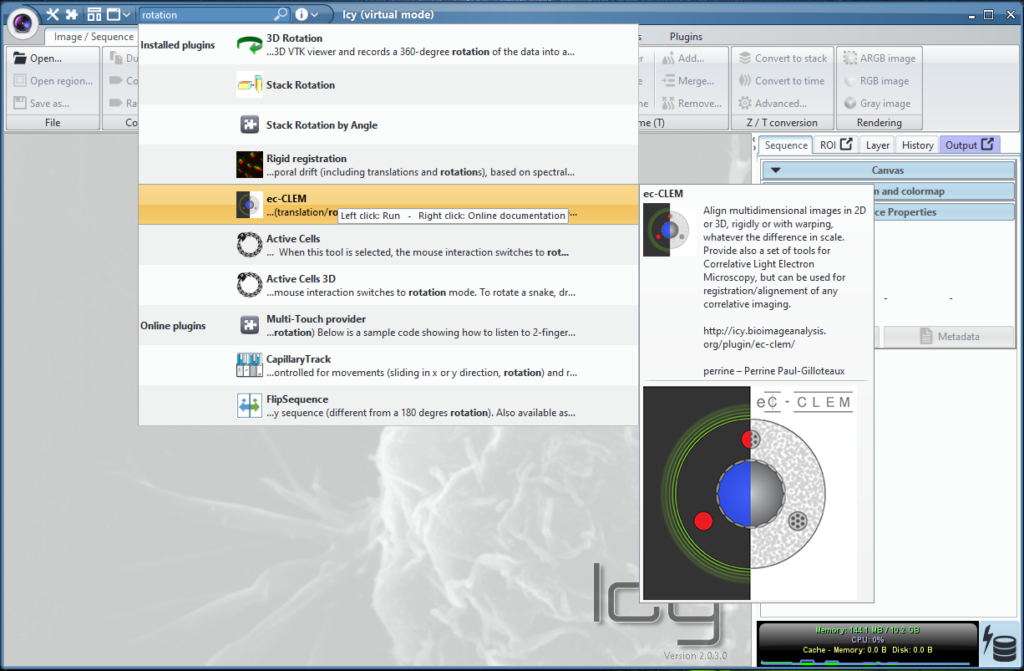
The column on the left indicates if the tool is a plugin, a protocol, a command and, for plugins and protocols, if they are installed already (“Installed plugins”, “Online plugins”).

Case 1: the plugin is already installed

Click on the name of the plugin.

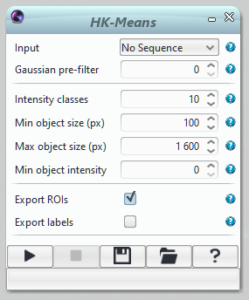
Case 1.1 It opens the plugin window

Here in the example, we searched for HK-Means in the search bar. It directly opens the plugin window and you can start processing the image with the plugin.
Case 1.2 It opens an information window about the plugin

In the example below, we searched for the SODAsuite:
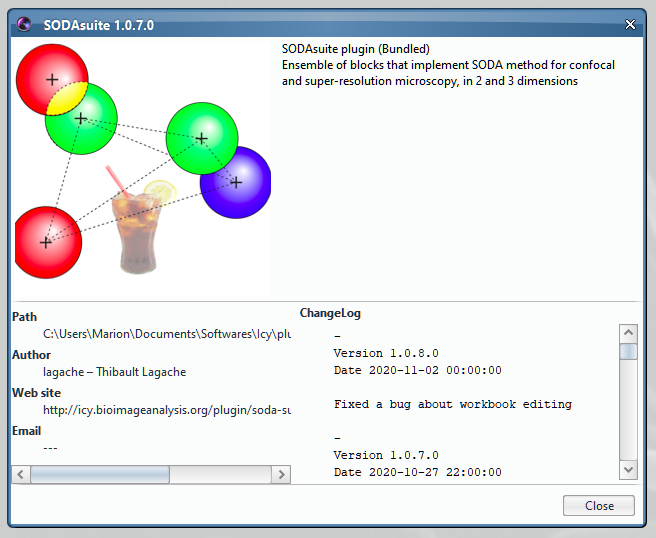
This plugin is a collection of plugins and has no main graphical interface. You need to search for individual plugins from this collection, for instance here “Spatial analysis”.

Case 2: the plugin is not installed

Click on the name of the plugin to download it from the Icy website. Go back to case 1.


The plugin is not published on the Icy website

Your favorite collaborator gave you a .jar file or you downloaded a .jar file from the internet.

Move the .jar file in the /plugins folder of the Icy software. Reopen Icy. The plugin should now be available in the Plugins tab. Note that the plugin will not be updated automatically because it is not on the Icy website.

Leave a Review Cancel reply

You must Register or Login to post a review.

Leave a review
Cancel review

Welcome

Welcome to the Icy community support.

View Forum

Google Group

We’re migrating to a new Forum ⚡️, but if you need to access the old Google Group, please follow this link. All new topics should be opened here from now.

Latest Articles

  • Creating an Icy plugin with EzPlug
  • Creating blocks for Icy protocols
  • Installation instructions for Icy software
  • Code of Conduct
  • Icy cheat sheets
Icy is founded by
Institut Pasteur
France BioImaging
Resources
Plugins Protocols Scripts
Get Involved
Contributors Information Trainings Join Icy
Support
Forum Articles FAQ Ask for help
About
Aknowledgements Bioimage Analysis Contributors Privacy Policy
Credits
Designed by Yhello
contact
Yhello is a digital creation agency based in Paris, created by former scientists passionate about the web.
Loading login form...
Privacy and cookies

We use necessary cookies to run the site. Optional categories stay blocked unless you allow them.

Your browser privacy signal is active, so analytics and marketing remain disabled.

Privacy page

Manage cookie preferences

Necessary cookies are always active. Optional categories stay blocked until you allow them.

Your browser privacy signal is active, so analytics and marketing remain disabled.

Privacy page